How They Work
Digital network cameras and video servers are sophisticated units. Essentially they are mini-computers in their own right and the following provides a relatively detailed explanation of how they operate.
Video servers are primarily used where an existing analogue system is to be retained and built upon. By connecting existing analogue cameras to video servers, the surveillance system is capable of being upgraded to incorporate the full set of features available in a digital system.
Network cameras and video servers both connect directly to the network as any other network device and have their own unique address and built-in computing functions to handle network communication. Everything needed for viewing images over the network is built into the unit. They have software for a Web server, File transfer server, File transfer client and eMail client. Other features include alarm input and relay output functions - allowing connection of motion sensors and control of switches for alarms and lighting etc. More advanced network cameras can also be equipped with many other value-added options such as motion detection and an analogue video output.

The Network Camera
 |
Different network cameras are available for different applications. Some are internal-only devices as they do not have optical filters to reduce harmful ultra-violet which could subsequently damage the image sensor.
Other types of cameras have more advanced processing 'engines' offering the very best quality and compression of the served image.
Finally different cameras provide different output ports - some support audio and other external devices to be fitted. They all, however, process data in a similar fashion. |
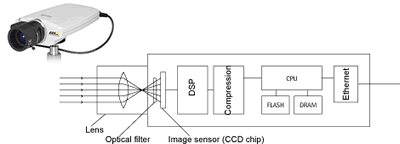
1. The network camera receives an image as light waves that pass through the lens and, if fitted, an optical filter.
2.
The filtered image is rendered on to the image sensor.
3.
The sensor passes the image to the digital signal processor which converts the image into digital signals.
4.
Colour and white-balance adjustments are made.
5. The image is then 'compressed' to maximise quality but also to ensure it is of a useful size to send across a network.
6. The CPU and memory of the unit then 'buffer' (store) recent images and handle transmission through the Ethernet network interface.
7. Additionally, a modem port can be used to control the device other than via the network.
Additionally, see the Adobe ® Acrobat ® Reader formatted New York Times (1.1Mb) article for a highly graphical view of a network camera.
The Network Video Server
 |
Similarly to the network camera, the video server is available in different forms for different roles.
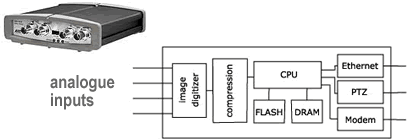
The technology is very similar except a video server takes its image information from a connected device (up to 4 channels may be connected).
|
1. The video server is connected to analogue-type cameras.
2. The images
are digitised - producing digital signals of the interpreted image.
3. Colour and white-balance adjustments are made.
4. The image is then 'compressed' to maximise quality but also to ensure it is of a useful size to send across a network.
5.
The CPU and memory of the unit then 'buffer' (store) recent images and handle transmission through the Ethernet network interface.
6. Additionally an interface
port for a modem and pan/tilt/zoom support for connected cameras extends the device.
|


 products/.. how they work
